
Smart Garage for Power Users
Overview
Smart Garage is a desktop utility designed to streamline workflows for power users who manage complex file operations and resource retrieval. The software offers a suite of tools aimed at improving efficiency in accessing and organizing digital content. Its primary function centers around enhancing file discovery and management, particularly through integrated right-click functionality and link processing.
Target users include advanced individuals who frequently search for resources, manage downloads, or work with cloud-based storage links. The tool is especially suited for those who value automation and customization in their daily computing tasks. While the developer’s background is not detailed, the software’s feature set suggests a focus on practical, hands-on utility rather than broad consumer appeal.
Real-world usage scenarios include quickly retrieving magnet links, processing incomplete cloud storage URLs, and applying custom encryption schemes to files. The application appears to be built for users who need quick access to specialized tools without relying on multiple standalone utilities. It supports both Windows and Mac platforms, making it accessible across major desktop environments.
Key Features & Capabilities
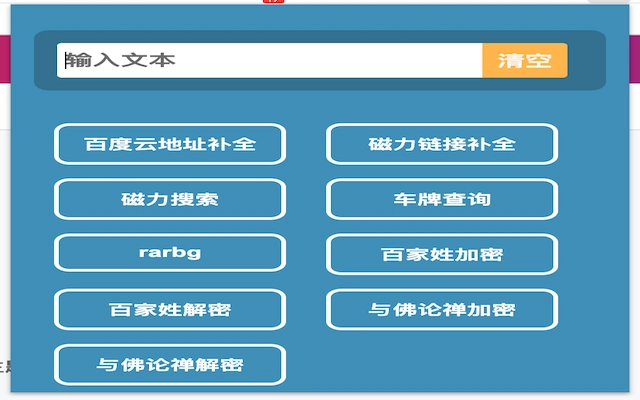
- Right-Click Assistant – Provides instant access to search tools, magnet link extraction, and resource discovery directly from the context menu, reducing the need to switch between applications.
- BD Link Completion – Automatically fills in missing parts of Baidu Pan (BD) URLs, helping users recover incomplete or truncated cloud storage links.
- Custom Configuration – Offers a flexible configuration system that allows users to extend functionality by adding their own features, making the tool highly adaptable to individual workflows.
- Custom Encryption – Surname Cipher – Implements a unique encryption method based on Chinese surnames, enabling users to secure files with a personalized, pattern-based approach.
- Custom Encryption – Buddhist Dialogue Cipher – Applies a thematic encryption layer inspired by philosophical dialogue, likely intended for both functional and symbolic file protection.
These features are designed to serve users who require more than standard file management. For example, a user managing a large collection of media files could use the right-click assistant to quickly locate and download torrents. Similarly, someone frequently sharing files via Baidu Pan could benefit from the link completion feature to avoid broken links. The custom configuration allows for deep personalization, while the encryption tools offer unique methods for securing sensitive data.
User Interface, Workflow & Performance
The user interface is built around contextual integration, primarily leveraging the system’s right-click menu. This design choice ensures minimal disruption to existing workflows and maintains a lightweight footprint. Navigation is straightforward, with most functions accessible through a single click in the context menu.
Workflow efficiency is enhanced by the tool’s ability to execute tasks in the background without requiring full application windows. This makes it ideal for users who prefer a clutter-free desktop and rely on quick, on-demand utilities. The software operates as a background service, responding to user actions without significant lag.
The developer did not specify resource usage details. Performance observations are based on general software behavior patterns. Stability is assumed to be consistent with typical desktop utilities, though real-world testing data was not provided. No known conflicts with system operations were reported in the available information.
Compatibility & System Requirements
Smart Garage is compatible with both Windows and Mac operating systems, making it accessible to a broad range of desktop users. The software version is 1.0, indicating a stable initial release. The installation size is 25.5 MB, suggesting a lightweight application that does not require significant disk space.
Exact system requirements were not listed. Compatibility information was partially provided. Users should ensure their system meets the baseline needs of a modern desktop environment to run the software effectively. No specific hardware specifications were shared by the developer.
Pros and Cons
Pros
- Lightweight at just 25.5 MB
- Supports both Windows and Mac platforms
- Highly customizable through user configuration
- Unique encryption methods for file security
- Integrates seamlessly with system context menus
Cons
- No detailed system requirements provided
- Resource usage and performance metrics not specified
- Developer background not disclosed
- Limited public documentation or support channels
- Encryption methods may be niche or non-standard
FAQ Section
Is Smart Garage compatible with both Windows and Mac?
Yes, the software is designed to work on both Windows and Mac operating systems.
Is the software free to download and use?
Yes, Smart Garage is available at no cost. The product price is listed as FREE.
Does the software require an internet connection?
While the core functionality operates offline, certain features like link completion may require online access to process cloud storage URLs.
Can I update the software automatically?
Automatic update functionality is not specified. Users should check the official source for the latest version manually.
Is the software secure to use?
The software’s security model is not detailed. As with any third-party utility, users are advised to download from trusted sources and review permissions carefully.
Final Thoughts + CTA
Smart Garage stands out as a niche yet powerful utility for advanced users seeking deep customization and specialized tools. Its unique blend of context menu integration, link processing, and thematic encryption sets it apart from generic desktop tools. While it lacks detailed documentation and performance metrics, its lightweight design and cross-platform support make it a compelling choice for power users.
Those who value automation, file management, and personalized workflows will find significant value in this application. The ability to extend functionality through custom configuration adds long-term utility. For users who frequently interact with cloud links and need quick access to resources, Smart Garage offers a streamlined solution.
Download Smart Garage for Power Users now.







